button in Safari
Spoteez Review: The Poker Table Management Tool for Multitablers



If you've ever tried to juggle four, six, or ten poker tables at once, you know the chaos that follows. Windows overlapping, tables buried behind each other, and half your focus wasted just finding your next hand. Spoteez was built to fix exactly that.
Here's everything you need to know about this poker tool that's designed to make your life easier - be it the features, compatibility, pricing, or more, it's all here.
What Is Spoteez?
Spoteez is a Windows-based utility designed for online poker players who play on multiple tables across one or more monitors. Its core job is to automatically tile your open poker tables into a clean, organized grid so you never have to manually drag and resize a window again.
Unlike poker tracking software or HUDs, Spoteez doesn't touch gameplay. It has no idea what cards you're holding or what your opponents are doing. It's purely a layout manager - a traffic controller for your desktop.
How It Works
Getting started with Spoteez requires almost no setup and is very easy to do.
Download the software from spoteez.com, create an account, and log in. No manual configuration, no screen mapping, no technical setup required.
Once you're in, Spoteez automatically detects how many monitors you have connected. From there, the process is straightforward:
Set your tables per screen.
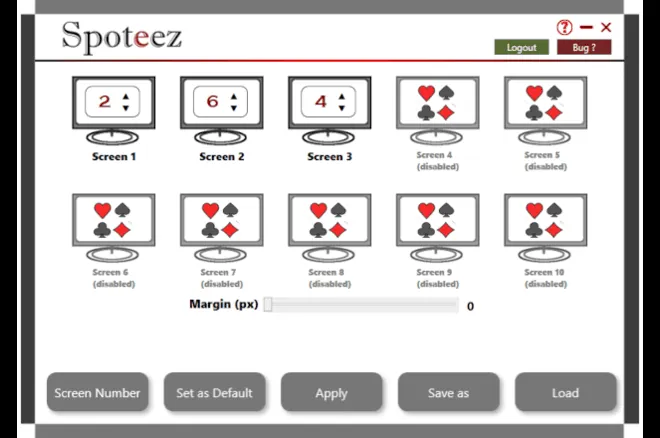
The interface shows up to ten monitor slots. Active screens display a simple number picker, you just need to dial in how many tables you want tiled on each one. Monitors that aren't connected appear grayed out but remain visible in the layout.
Adjust the margin.
A pixel slider at the bottom lets you add spacing between your tiled tables. Leave it at zero for edge-to-edge tiling, or dial in a few pixels if you prefer a little breathing room between windows.
Apply and go.
Hit Apply and Spoteez arranges your open tables into a clean grid. If you request more slots than you currently have tables open, those spaces stay empty and ready, so new tables snap into position as you open them, which is handy if you build up your action gradually through a session.
Save your setup.
Once you have a layout you like, you can name it and save it for later. Spoteez supports multiple saved configurations (which is very useful if you play different formats that require different layouts), and you can set any one of them as your default, so it loads automatically each time.
Spoteez Features at a Glance
- Automatic screen detection — no manual monitor configuration required
- Up to 10 monitors supported
- Per-screen table count — set different numbers of tables on each screen
- Adjustable margins — control the pixel gap between tiled tables
- Screen numbering display — toggle on-screen numbers to identify monitors quickly
- Save and load configurations — name and store your favorite layouts for different session types (6-max grind, tournament stack, heads-up setup, etc.)
- Default configuration — set your go-to layout to load automatically on launch
- Force apply — manually push a layout refresh if something gets out of sync
What Software is Spoteez Compatible With?
Spoteez works with the vast majority of standard downloadable poker clients, covering both .fr and .com variants of major sites.
However, there is one limitation worth noting: browser-based poker tables are not supported. If your preferred room runs through a web browser rather than a dedicated download, Spoteez won't be able to manage those windows.
It's also worth noting Spoteez is currently Windows only, meaning Mac users or others will need to look elsewhere for now.
Some poker rooms may also restrict automatic window resizing. Spoteez recommends checking your platform's terms of service before use, as the app interacts with window positioning rather than game data.
How Much Does Spoteez Cost?
Spoteez is available for €7 per month, with the flexibility to cancel at any time, and access continues through the end of your billing period after cancellation. For a dedicated grinder running multiple tables daily, that works out to less than the cost of a single buy-in at micro stakes.
Who Is Spoteez For?
Spoteez is squarely aimed at volume players, so anyone regularly running more than two or three tables who finds manual window management a distraction will get the most out of the tool.
Recommended players for the software include, but are not limited to:
- Mass multitablers who need a consistent, repeatable layout each session.
- Multi-monitor setups, where spreading tables across screens requires careful coordination.
- Tournament grinders who stack up late-registration tables and need everything visible at once.
To be honest, casual players or those who stick to one or two tables at a time probably won't feel the need, but for anyone whose desktop regularly looks like a game of window Tetris, Spoteez offers a clean, cheap, low-friction solution.
PokerNews Verdict: Spoteez
Spoteez does one thing and does it well. It's not trying to be a HUD, a solver, or an all-in-one poker suite. It's a focused utility that removes a genuine friction point from the multitabling experience.
At €7/month with no long-term commitment, it's an easy tool to trial, and for players who rely on clean table layouts to stay in rhythm, it may quickly become indispensable - especially at the price.
More information: www.spoteez.com
Support: [email protected]