
 button in Safari
PartyPoker Download – Get Started at PartyPoker Today

You've heard all about PartyPoker, you've read PokerNews' impartial review of the online poker giant, and now you're ready to become a PartyPoker player. Thousands of PartyPoker players download the software onto their computers or laptops and enjoy some of the softest cash games and most exciting tournaments found anywhere online. Those same players receive up to 20% weekly cashback on their real-money play. Are you ready to join them?
The good news is that PartyPoker has streamlined the downloading and account creation process, meaning you can play at PartyPoker within minutes of downloading PartyPoker to your favorite device. Before you know it, you'll be splashing around in PartyPoker's Daily Legends tournaments, qualifying for major live poker events, and battling for supremacy in cash games, fastforward "fast-fold" games, and jackpot SPINS sit & go tournaments.
How to Download PartyPoker
PartyPoker has been around for two decades, and its experience shows in how easy it is to download the software and start playing on the site's exciting game portfolio. Start by downloading the PartyPoker software via PokerNews. If you download PartyPoker via a Windows-powered computer, that version will download and install on your machine. Likewise, using a Mac will automatically download the correct software.
Depending on the speed of your internet connection, downloading PartyPokermay only take a few seconds, but it may take a couple of minutes if your internet is running slower than usual. Once downloaded and installed, you are now ready to create your free PartyPoker account.
How to Create Your PartyPoker Account
Once the download and installation processes have finished, click the "Create an account" link as shown in the image below.
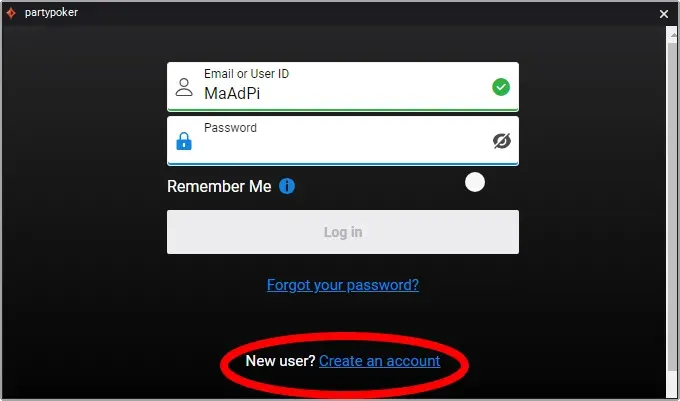
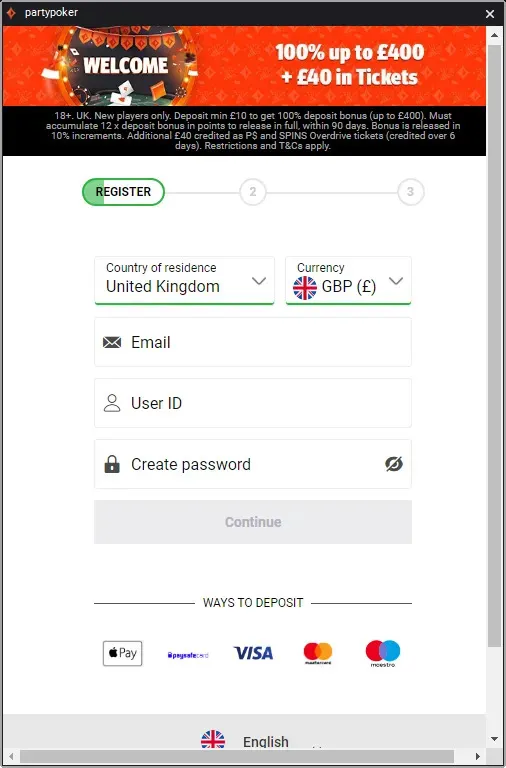
Clicking the "Create an account" link opens a new window containing three forms that you are required to fill in. PartyPoker needs information such as your email address, the alias you want to use at PartyPoker, password, postal address, date of birth, and telephone number. Once you have filled in the trio of forms, you need to read PartyPoker's terms and conditions, and once you have agreed to them, you will become a PartyPoker player.
Do I Need to Verify My PartyPoker Account?
Like all licensed and regulated online poker sites, PartyPoker requires you to confirm your identity and verify your account details. PartyPoker will send you a text message or email requesting this information.
Alternatively, a pop-up message may greet you when you start the PartyPoker software. This simple process, which takes place on a secure PartyPoker-owned website, usually involves sending a photograph of your government-issued identification and maybe proof of address, such as a bank statement or similar document.
Some players, including those from the United Kingdom, may be asked to provide proof of income and to set deposit limits on their accounts. This is perfectly normal and due to the UK Gambling Commission (UKGC) being PartyPoker's license issuer in the UK. The UKGC is strict regarding potential problem gambling, and PartyPoker always adheres to the terms and conditions of its licences.
PartyPoker aims to verify players' accounts within 48 hours. However, additional time may be required in more complex cases.
What Are the System Requirements For PartyPoker?
Although the PartyPoker software is advanced, you do not need a top-tier gaming rig to run it. The PartyPoker basic system requirements are:
- Windows XP / Windows Vista / Windows 7 / Windows 8 / Windows 10
- Minimum of 512 MB of RAM
- Screen resolution of at least 800 x 600 pixels with at least 256 colors
What Are The Advantages of Downloading PartyPoker Compared to the Mobile App?
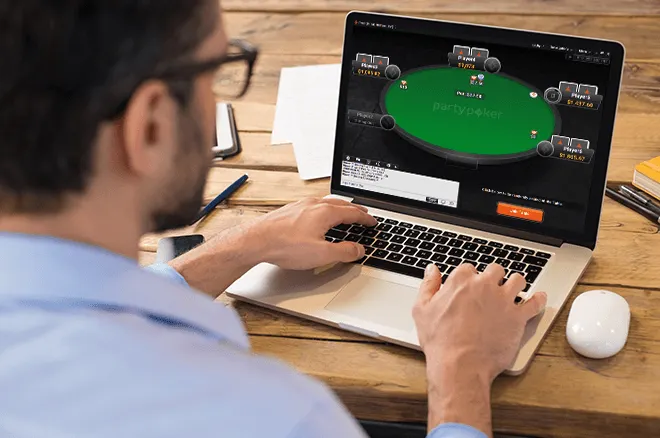
You may wonder why you should download PartyPoker to your computer or laptop when the PartyPoker mobile app is one of the best on the market. While the PartyPoker app is excellent for on-the-go or casual play, the downloadable client is far superior for anyone taking poker even remotely seriously.
First of all, multi-tabling is far easier on the downloadable desktop PartyPoker client than on the mobile app. Moreover, while the mobile poker app limits you to playing a maximum of four tables, you can play many more if you download PartyPoker to your computer or laptop.
Multi-tabling on the downloadable PartyPoker software is also easier, not only because your monitor or screen is far larger than that of a mobile phone, but because the download version of PartyPoker allows you to use custom hotkeys for specific actions.
The PartyPoker downloaded software has a full suite of features, including the hand replayer, note-taking, more filters, and the aforementioned hotkeys. Though the PartyPoker mobile app is feature-rich, some of the more advanced features are stripped out to keep the user interface (UI) clean.
Last, but certainly not least, having PartyPoker downloaded on your machine makes it possible to use the PokerNews Online Tournament Calendar (OTC). This free-to-use PokerNews feature allows you to find upcoming and in-play multi-table tournaments at PartyPoker and register for them with a mouse click or two. Clicking the "register" button on the OTC opens the PartyPoker client, but it cannot open your mobile app.
PartyPoker Download FAQs
How reliable is the PartyPoker download?
PartyPoker's downloadable software is stable and reliable, with users experiencing minimal downtime. On the rare occasions that PartyPoker suffers connectivity issues, its tech and support team usually quickly rectifies the problem.
Is downloading PartyPoker free?
Yes! You can download PartyPoker for free via PokerNews. Creating an account is also free. However, when you play for real money, PartyPoker charges a small fee in tournament poker and takes a small percentage of each cash game pot. This is called rake; every online and live poker room globally charges rake.
How long does it take to download PartyPoker?
The length of time it takes to download the PartyPoker software depends on your internet connection. Those with fast internet should have the software downloaded and installed in a few seconds.
What are the PartyPoker system requirements?
PartyPoker will run on almost all modern computers and laptops, so long as they are running Windows XP / Windows Vista / Windows 7 / Windows 8 / Windows 10, have at least 512 MB of RAM, and your screen resolution is at least 800 x 600 pixels with at least 256 colors.
Why should I download PartyPoker?
Downloading PartyPoker ensures you have the best experience playing poker on the site. The PartyPoker mobile poker app is first-class, but the downloadable client has more features and is easier to use for multiple tables.
Can I use a HUD if I download PartyPoker?
No, you cannot use a HUD when playing online at PartyPoker. You can request your hand histories the 24 hours after your poker session, which can then be uploaded into tracking software for analysis, but HUDs are prohibited at PartyPoker.